
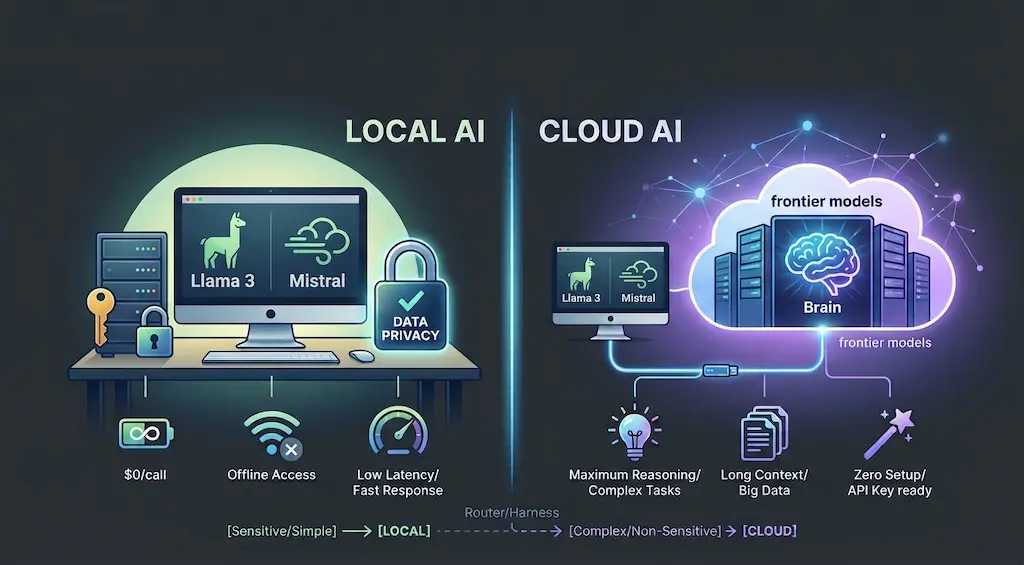
Short Answer (TL;DR)
Run AI models locally when privacy, predictable cost or offline access matters more than raw capability. Use cloud models when you need the strongest reasoning, long context or zero setup. For most developers the best answer is a hybrid: local models for routine and sensitive work, and cloud models for the hard problems, both behind one harness.
Introduction
As a product engineer working mostly with React, Next.js, Laravel and TypeScript, and more and more with AI tooling, I regularly have to choose between running a model on my own machine and calling a cloud API. This post covers how I decide, and how to combine both without making your stack more complicated.
What Is Local AI?
Local AI means the model runs on hardware you control, such as your laptop, a workstation or your own server, and not behind a provider's API. You download open-weight models, such as Llama, Qwen, Mistral, Gemma or DeepSeek variants, and serve them with a runtime like Ollama, LM Studio, llama.cpp or vLLM.
Your prompts and data never leave your machine, and each call costs nothing beyond your hardware and electricity.
One caveat: check each model's license. Open-weight doesn't always mean open-source, or free for commercial use.
What Is Cloud AI?
Cloud AI means you call a hosted model through an API, such as OpenAI, Anthropic, Google or other providers. You pay per token, get the most capable frontier models, and don't manage any infrastructure.
You trade some control for capability and convenience.
Local AI vs Cloud AI: A Side-by-Side Comparison
| Factor | Local AI | Cloud AI |
|---|---|---|
| Privacy | Data stays on your machine | Data is sent to the provider; retention depends on their terms |
| Cost model | Hardware up front, then near-zero per call | Pay per token, grows with usage |
| Capability | Good for focused tasks, weaker on complex reasoning | Strongest reasoning and longest context |
| Speed | Depends on your hardware | Fast and consistent, plus network latency |
| Offline use | Works without internet | Needs a connection |
| Setup | You install, update and tune models | An API key and you're running |
| Scaling | Limited by your machines | Scales with your budget |
When Should You Run Models Locally?
Run locally when the task is repetitive, sensitive or high-volume, and a smaller model handles it well. These are the cases where local AI earns its place:
- Embeddings and semantic search. Embedding models are small and fast, and you may need to embed thousands of documents. Running them locally keeps the cost flat.
- Private documents. Client contracts, internal code, financial data or anything under an NDA can be summarized, classified or searched without leaving your machine. Nothing is sent to a third party, which also makes data-protection rules such as GDPR easier to reason about.
- Dev tooling. Commit message suggestions, quick code explanations, log summaries and test data generation don't need a frontier model.
- Simple agents. Agents that classify, extract or route, with clear inputs and outputs, often work well on a small local model.
- Offline and edge work. When you're traveling, on a weak connection or building for an environment without reliable internet.
When Does Cloud AI Still Win?
Use cloud models when quality on hard problems matters more than cost or privacy. Specifically:
- Complex multi-step reasoning, architecture decisions and debugging across large codebases.
- Long-context work, such as reading a full repository or a long specification in one pass.
- Production features where your users expect the best answer every time.
- Prototyping, where you want to test an idea today and not spend the afternoon tuning a model.
If a wrong answer is expensive, start with the cloud.
A Practical Local AI Starter Setup
The fastest way to start is a local runtime with an OpenAI-compatible API, so your existing code works with both local and cloud models. A simple setup looks like this:
- Install a runtime. Ollama is the easiest place to start. LM Studio is a good choice if you prefer a desktop interface.
- Pull a small general model and an embedding model. Start with a quantized model in the 7B to 8B range. It typically needs around 6 to 8 GB of RAM, so 16 GB of RAM is comfortable on a modern laptop. Upgrade only if quality isn't enough.
- Use the OpenAI-compatible endpoint. Ollama serves one at
http://localhost:11434/v1, so the same SDK you use for the cloud can point at your machine. - Measure before you commit. Run your real tasks through the local model and compare the output with a cloud model before you switch anything over.
The Hybrid Pattern: Route Tasks Inside One Harness
The best setup isn't local or cloud. It's a router that sends each task to the cheapest model that can handle it well. This is where an AI harness pays off. If you're new to the term, I explain it in AI Harness vs AI Agent vs AI Orchestration.
Here's a minimal TypeScript example. The model names come from environment variables, so you can use whichever local and cloud models you prefer:
import OpenAI from "openai";

const local = new OpenAI({
  baseURL: "http://localhost:11434/v1",
  apiKey: "ollama", // required by the SDK, ignored by Ollama
});

const cloud = new OpenAI({
  apiKey: process.env.OPENAI_API_KEY,
});

const LOCAL_MODEL = process.env.LOCAL_MODEL!;
const CLOUD_MODEL = process.env.CLOUD_MODEL!;

type Task = {
  prompt: string;
  sensitive: boolean;
  complex: boolean;
};

async function ask(client: OpenAI, model: string, prompt: string) {
  const res = await client.chat.completions.create({
    model,
    messages: [{ role: "user", content: prompt }],
  });
  return res.choices[0].message.content ?? "";
}

export async function run(task: Task, isValid: (answer: string) => boolean) {
  const useLocal = task.sensitive || !task.complex;

  if (!useLocal) return ask(cloud, CLOUD_MODEL, task.prompt);

  const answer = await ask(local, LOCAL_MODEL, task.prompt);
  if (isValid(answer)) return answer;

  if (task.sensitive) {
    throw new Error("Local answer failed validation. Review it manually.");
  }
  return ask(cloud, CLOUD_MODEL, task.prompt);
}
The rules are simple:
- Sensitive data always stays local, and it never falls back to the cloud. If the local answer fails validation, the task goes to a human.
- Simple tasks go local first.
- Complex tasks with non-sensitive data go straight to the cloud.
- If a non-sensitive task fails validation on the local model, it is retried in the cloud.
Decision Checklist: Local or Cloud?
Ask these questions for each AI task in your product or workflow:
- Does the data have to stay private? If yes, go local.
- Can a small model do it well? Test it. If yes, go local.
- Does it run thousands of times a day? If yes, local usually saves money.
- Is a wrong answer expensive? If yes, use the cloud.
- Does it need long context or deep reasoning? If yes, use the cloud.
- Do you need it working today with no setup? If yes, start in the cloud and move it local later.
FAQ
Is local AI good enough for coding?
For autocomplete, explanations and small refactors, often yes. For complex debugging and architecture work across a large codebase, cloud models are still clearly ahead.
Do I need a GPU to run local AI?
Not to get started. Small quantized models run on many modern laptops, and Apple Silicon Macs handle them well. A dedicated GPU makes larger models and faster responses practical.
Is local AI really free?
Each call is close to free, but you pay for hardware, electricity and your own time on setup and maintenance. It's cheapest when your usage is high and steady.
Can I switch between local and cloud models without rewriting code?
Yes. Use a runtime with an OpenAI-compatible API and keep model selection in one place, like the router above.
Conclusion
Local AI and cloud AI aren't competitors. They're two tools in the same system. Keep private, repetitive and high-volume work on your own machine, send the hard problems to the cloud, and put a harness in charge of the routing. That's how you get privacy, cost control and top-quality answers from the same stack.
If you're building an AI system and want help designing this kind of hybrid setup, get in touch.