
Quick Answer (TL;DR)
- An AI harness is the runtime and scaffolding around a model. It covers prompts and context, tool access, memory and state, loop control, guardrails, and logging/evals. It's the thing that turns a raw model into a working system.
- An AI agent is a system where the model decides its own next step in a loop. It looks at its situation, picks an action (often a tool call), sees the result, and repeats until the goal is met or it's stopped.
- AI orchestration is the coordination layer that decides what runs, in what order, and who handles what. It covers sequencing, routing, parallel work, handoffs, human approvals and error handling, across agents or plain LLM calls.
In short: the harness is what the model runs inside, the agent is a behaviour (model-driven decisions in a loop), and orchestration is how several pieces are coordinated.
Introduction
As a product engineer working mostly with React, Next.js, Laravel and TypeScript, and more and more with LLM tooling, I keep seeing these three terms used as if they meant the same thing. They don't. Mixing them up leads to bad architecture decisions, usually building an "agent" where a simple pipeline would have done the job.
This post explains each term, how they fit together, and how to choose the right level of complexity.
One caveat first: the industry hasn't standardised these terms. The definitions below reflect how they're most commonly used in practice, and they're the ones I find most useful when building.
What Is an AI Harness?
An AI harness is the software layer that wraps a language model and controls how it runs: what context it sees, which tools it can call, what state it keeps, when it stops, and what it's not allowed to do. The model generates text. The harness makes that output useful and safe.
A typical harness handles:
- Prompts and context: system instructions, retrieved documents, conversation history, and trimming context to fit the window.
- Tools: defining functions the model can call (search, database queries, file edits, APIs), running them, and feeding the results back.
- Memory and state: what persists between steps or sessions (scratchpads, summaries, task state).
- Loop control: max iterations, timeouts, token and cost budgets, stop conditions.
- Guardrails: input/output validation, permission checks, schema enforcement, blocked actions.
- Observability and evals: logging every prompt, tool call and output, plus tests that check the system still behaves correctly after changes.
A coding assistant that reads your repo, runs tests and edits files is a good mental model. The model is only one part of it. The file access, command sandbox, permission prompts and context management are all harness.
Side note: "harness" also appears in "evaluation harness", meaning a framework for running benchmarks against a model. That's related but narrower. In this post, harness means the full runtime around the model.
What Is an AI Agent?
An AI agent is a system where the language model decides its own next action in a loop, working toward a goal: it looks at the current state, picks an action, runs it through tools, sees the result, and keeps going until it finishes or is stopped. The key word is decides. The control flow isn't fully written in advance by you.
The basic agent loop:
goal → [observe state] → [model decides next action] → [execute tool] → [observe result] → repeat or finishWhat makes something an agent is who controls the path. If your code says "step 1: classify, step 2: summarise, step 3: save", that's a workflow that happens to use an LLM. If the model chooses between searching, reading a file, asking a clarifying question or finishing, based on what it just saw, that's an agent.
Note that an agent always needs a harness. The loop, the tools, the stop conditions and the guardrails are all harness parts. So "agent" describes a behaviour pattern, and the harness is the infrastructure that makes the behaviour possible.
What Is AI Orchestration?
AI orchestration is the coordination layer that manages how several AI steps, models, agents, tools and humans work together: sequencing, routing, running work in parallel, passing context between steps, inserting human approvals, and recovering from failures.
Orchestration covers:
- Sequencing: step B runs after step A, using A's output.
- Routing: sending a request to the right model, prompt or agent based on its type.
- Parallelism: running independent tasks at the same time and merging the results.
- Handoffs: passing a task and its context from one component to another.
- Human-in-the-loop: pausing for approval before risky or irreversible actions.
- Error handling: retries, fallbacks to another model, timeouts, dead-letter queues.
An important point that's often missed: orchestration doesn't need agents. You can orchestrate five plain, single-shot LLM calls in a fixed pipeline. That's still orchestration. Orchestration can also be deterministic code (a queue, a state machine, a workflow engine) or a model acting as a "planner" that hands tasks out to others.
How Harness, Agent and Orchestration Fit Together
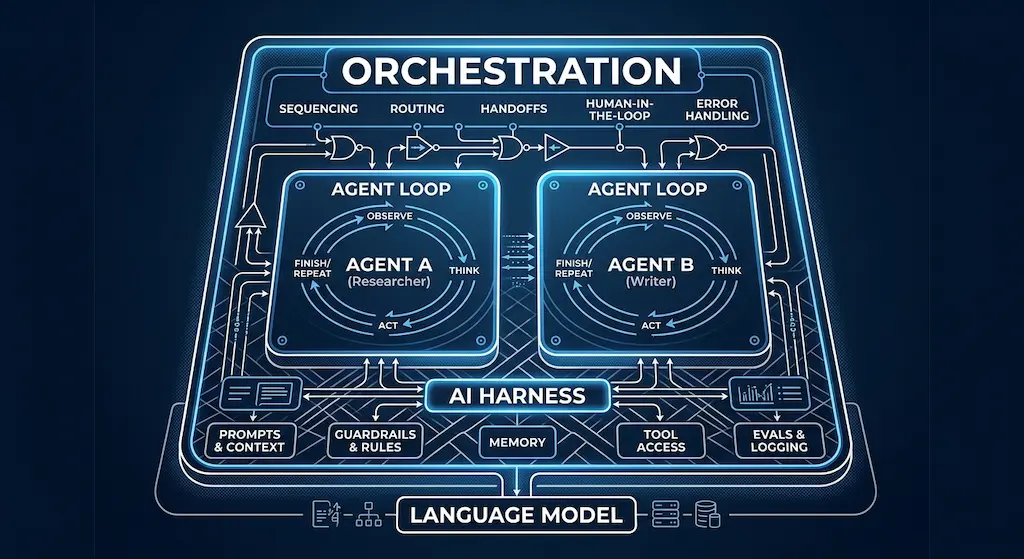
The harness is the base layer, agents are one way to use it, and orchestration sits on top to coordinate multiple units. They're layers, not competing options.
Orchestration
Agent A
Agent B
Plain LLM call
Harness
Language model(s)
In a small project, all three can live in one codebase and the lines blur. That's fine. The distinction is there to help you think clearly, not to force you into three separate services.
Comparison Table: Harness vs Agent vs Orchestration
| Aspect | AI Harness | AI Agent | AI Orchestration |
|---|---|---|---|
| What it is | Runtime/scaffolding around a model | Model-driven goal pursuit in a loop | Coordination layer across components |
| Core question | "How does the model run safely and usefully?" | "What should I do next to reach the goal?" | "Who does what, in what order, and what if it fails?" |
| Who controls flow | Your code (sets limits and rules) | The model (within harness limits) | Your code, a workflow engine, or a planner model |
| Key parts | Prompts, context, tools, memory, guardrails, logs, evals | Goal, loop, tool use, stop condition | Routing, sequencing, parallelism, handoffs, approvals, retries |
| Needs the others? | No, a single LLM call still runs in a minimal harness | Yes, always needs a harness | Needs components to coordinate; they don't have to be agents |
| Example | A chat backend with RAG, tool calling and output validation | A coding assistant that explores a repo and fixes a failing test | A pipeline that classifies, routes and escalates support tickets |
AI Agent vs Multi-Agent System vs Autonomous Agent
An agent is one model-driven loop. A multi-agent system is several agents working together, which needs orchestration. "Autonomous" describes how much an agent does without human approval, so it's a property that runs across both, not a separate architecture.
| Aspect | AI Agent | Multi-Agent System | Autonomous Agent |
|---|---|---|---|
| What it describes | A single entity running its own think-act-observe loop | Several agents with separate roles, prompts or tools, coordinated together | The degree of independence: how little human approval it needs |
| Type of concept | Architecture unit | Architecture pattern | Property on a spectrum |
| Relation to orchestration | May not need any | Needs it (supervisor, handoffs, shared state) | Shapes the orchestration (fewer approval checkpoints) |
| Example | One research agent with search + read tools | A planner agent hands tasks to a researcher and a writer, and a reviewer checks the output | Either of the above, running end-to-end without pausing for sign-off |
A few nuances:
- Multi-agent isn't automatically better. Every extra agent adds handoffs, more context to pass around, more cost and more places to fail. Split into several agents when roles really need different tools, permissions or context. Don't split just because it looks neat in a diagram.
- Autonomy is a dial, not a category. A single agent can be highly autonomous (runs overnight, opens PRs), and a multi-agent system can be tightly supervised (a human approves every handoff). A useful set of levels: suggests only → acts with approval → acts on its own with reversible actions → acts fully on its own.
- More autonomy means the harness has to carry more weight: stricter guardrails, better logging, and solid evals.
Practical Examples
These are generic examples to make the concepts concrete. They don't describe specific client work.
Example 1: Support Ticket Triage (orchestration, no agent needed)
- An LLM call classifies the ticket (billing, bug, feature request, urgent).
- Code routes it to a queue based on the label.
- A second LLM call drafts a suggested reply using retrieved help-centre articles.
- A human agent reviews and sends it.
This is orchestrated LLM calls in a harness (with retrieval, output schema validation and logging). There's no agent, because the path is known in advance. That makes it more predictable, cheaper and easier to test.
Example 2: Automated Code Review (single agent + human-in-the-loop)
The harness gives the model read access to the diff and repo, plus tools for running the linter and tests. The agent decides which files to inspect, runs tests where needed, and writes review comments. Orchestration adds one rule: comments are posted as suggestions, and a developer approves any suggested change before it's applied.
An agent fits here because which files matter depends on what the model finds along the way.
Example 3: Content/Research Pipeline (multi-agent, orchestrated)
A planner breaks a topic into questions. Research agents run in parallel, each searching and summarising sources. A writer step drafts the piece, a reviewer step checks claims against the collected sources, and a human editor signs off before anything is published.
This is where orchestration matters most: parallel work, handoffs, retries when a source fails, and a final human checkpoint.
When Is an AI Agent Overkill?
An agent is overkill when you can write the steps down in advance. If the task follows a predictable path, a fixed workflow of LLM calls is usually cheaper, faster, easier to debug and easier to evaluate than an agent.
Use a simple pipeline/workflow when:
- The steps are known and stable (extract → classify → format).
- You need consistent, auditable output.
- Latency and cost matter more than flexibility.
Use an agent when:
- The number and order of steps depend on what's discovered along the way.
- The task involves exploring (codebases, documents, the open web).
- A reasonable person couldn't write the full flowchart upfront.
My rule of thumb: start with the simplest version that works, and only add agentic loops where a fixed path keeps breaking. It's the same principle I apply to any architecture decision, as in my comparison of Laravel + Inertia.js vs Next.js: pick the least complex option that fits the real requirements.
FAQ
Is an AI harness the same as an agent framework?
Not quite. An agent framework is a library that helps you build a harness and agent loops. The harness is the actual runtime your system uses, whether you build it with a framework or with your own code.
Can you have orchestration without AI agents?
Yes. Orchestration can coordinate plain, single-shot LLM calls, deterministic code and human steps. Many production AI features are orchestrated workflows with no agent in them.
Does every AI agent need a harness?
Yes. An agent needs something to run its loop, carry out tool calls, manage context, enforce limits and log what happened. That something is the harness, even if it's only a few hundred lines of code.
Is a multi-agent system the same as AI orchestration?
No. A multi-agent system is a set of coordinated agents. Orchestration is the coordination itself. Multi-agent systems need orchestration, but orchestration doesn't need multiple agents.
What makes an agent "autonomous"?
How much it can do without human approval. Autonomy is a spectrum, from suggest-only to acting fully on its own, and it can apply to a single agent or to a whole multi-agent system.
Conclusion: Choosing the Right Level of Complexity
The harness is the foundation every LLM system needs. Agents are a pattern where you let the model choose its own path. Orchestration is how you coordinate several pieces, with or without agents. Treating them as separate decisions makes it easier to build systems that are as simple as possible and only as complex as necessary.
Checklist before you build:
- Can one LLM call solve it? Use a single call in a minimal harness (prompt, validation, logging).
- Are the steps known in advance? Use an orchestrated workflow of LLM calls. No agent.
- Does the path depend on what's discovered? Use a single agent with a well-defined toolset and loop limits.
- Do sub-tasks need different tools, permissions or context? Consider multi-agent, with explicit orchestration and handoffs.
- How much autonomy is acceptable? Decide where humans approve, especially for irreversible actions.
- Can you observe and evaluate it? If you can't log it and test it, you're not ready to make it more autonomous.
Need help adding AI features to a web product, or deciding whether you really need an agent? At Dywan Dev, I build fullstack web applications with the simplest architecture that fits the problem. Let's talk.