
Introduction
Most website templates solve one problem for one type of business.
A luxury restaurant template looks beautiful but is useless for a pizzeria. A casual dining template feels warm but wrong for fine dining. So developers build three separate templates, maintain three separate codebases, and multiply their workload by three.
There is a better way.
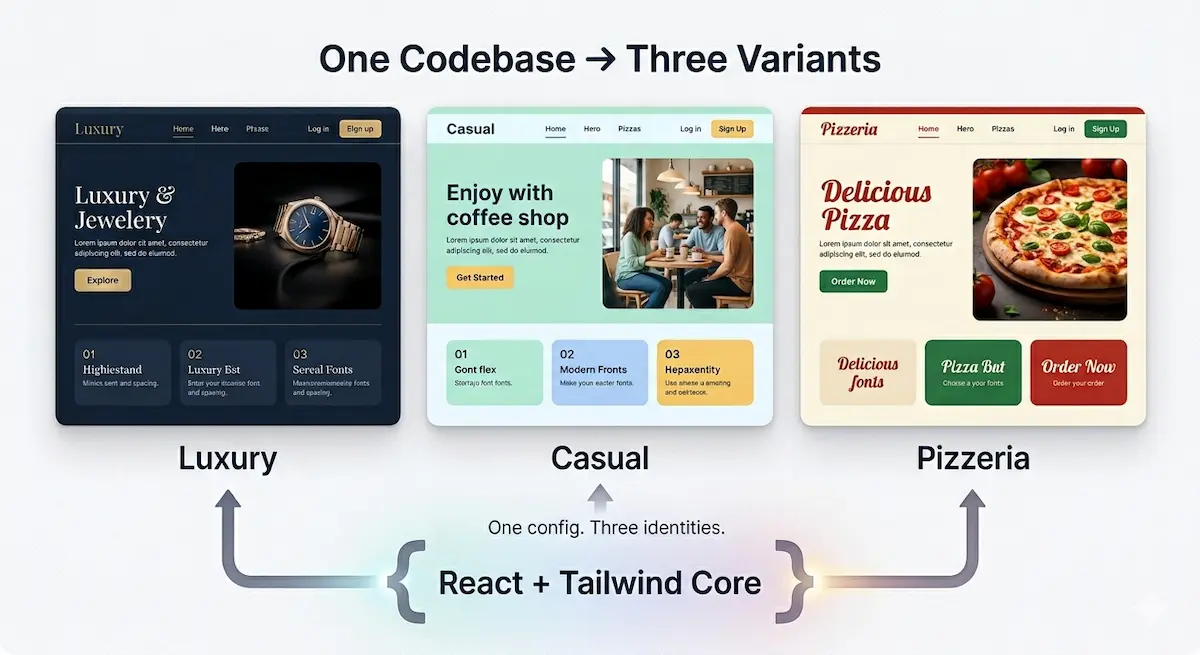
This guide walks you through how to architect a single React and Tailwind CSS codebase that produces multiple distinct visual variants — each with its own identity, personality, and design language — without duplicating a single component.
This is the exact architecture behind Savoura Dywan, a restaurant website template that ships three complete variants — luxury, casual, and pizzeria — from one unified codebase. By the end of this guide you will understand not just how to build it, but why every architectural decision was made.
What Is a Multi-Variant Template
A multi-variant template is a single codebase that renders meaningfully different visual experiences based on a configuration value.
Not just a color change. Not just a font swap. A genuine shift in visual identity — different color palettes, different typography scales, different spacing, different component personalities — while sharing the same underlying structure, logic, and components.
Think of it like a single actor playing three completely different characters. The skeleton is the same. The performance is entirely different.
This architecture serves two audiences:
Template buyers — businesses that need a professional website fast, configured to their specific brand identity, without custom development costs.
Developers — engineers who need to deliver multiple client projects quickly from a single maintained codebase, reducing build time and increasing consistency.
1. The Foundation — Central Configuration
Everything in a multi-variant template flows from one source of truth. Before writing a single component, define your configuration architecture.
Create src/config/siteConfig.js:
export const VARIANTS = {
  LUXURY: 'luxury',
  CASUAL: 'casual',
  PIZZERIA: 'pizzeria'
};

export const siteConfig = {
  // The single value that controls everything
  variant: VARIANTS.LUXURY,

  branding: {
    name: 'Le Jardin',
    tagline: 'Fine dining redefined',
    logo: '/assets/logo.svg',
    favicon: '/favicon.ico'
  },

  seo: {
    title: 'Le Jardin — Fine Dining Restaurant',
    description: 'An intimate fine dining experience in the heart of the city',
    keywords: 'fine dining, restaurant, gourmet, reservation',
    ogImage: '/assets/og-image.jpg',
    canonicalUrl: 'https://lejardin.com'
  },

  contact: {
    phone: '+212 6XX XXX XXX',
    email: 'contact@lejardin.ma',
    address: '12 Rue Mohammed V, Casablanca',
    mapUrl: 'https://maps.google.com/?q=...',
    whatsapp: '+212 6XX XXX XXX'
  },

  hours: {
    weekdays: '12:00 — 23:00',
    weekends: '11:00 — 00:00',
    closed: 'Monday'
  },

  social: {
    instagram: 'https://instagram.com/lejardin',
    facebook: 'https://facebook.com/lejardin',
    tiktok: ''
  },

  features: {
    enableReservations: true,
    enableWhatsApp: true,
    enablePWA: true,
    enableNewsletter: true,
    enableDarkMode: true,
    enableParticles: false,
    enableRTL: false
  },

  content: {
    heroTitle: 'Where Every Meal Becomes a Memory',
    heroSubtitle: 'Award-winning cuisine crafted with passion',
    aboutText: 'Founded in 2010, Le Jardin has been...',
    reservationText: 'Reserve your table for an unforgettable evening'
  }
};
This file is what your buyer touches. Nothing else. Every piece of content, every feature toggle, every contact detail — all in one place. The rest of the codebase reads from this config and renders accordingly.
2. The Variant Theme System
The visual identity of each variant lives in a dedicated theme file. This is where the real differentiation happens.
Create src/config/themes.js:
export const themes = {
  luxury: {
    // Colors
    primary: '#c9a84c',
    primaryDark: '#a8873a',
    secondary: '#1a1a2e',
    background: '#0d0d0d',
    surface: '#1a1a1a',
    text: '#f5f0e8',
    textMuted: '#9a8878',
    border: '#2a2a2a',
    accent: '#e8d5a3',

    // Typography
    fontHeading: '"Playfair Display", serif',
    fontBody: '"Cormorant Garamond", serif',
    fontMono: '"Courier Prime", monospace',
    headingWeight: '300',
    bodyWeight: '400',
    letterSpacing: '0.15em',

    // Spacing and sizing
    borderRadius: '0px',
    buttonRadius: '0px',
    cardRadius: '0px',

    // Motion personality
    transitionSpeed: '0.6s',
    transitionEasing: 'cubic-bezier(0.25, 0.46, 0.45, 0.94)',

    // Visual personality
    shadowStyle: '0 20px 60px rgba(0,0,0,0.5)',
    overlayOpacity: '0.7',
    heroHeight: '100vh'
  },

  casual: {
    primary: '#e07b39',
    primaryDark: '#c4622a',
    secondary: '#2d5016',
    background: '#faf7f2',
    surface: '#ffffff',
    text: '#2c2c2c',
    textMuted: '#6b6b6b',
    border: '#e8e0d5',
    accent: '#f4a261',

    fontHeading: '"Nunito", sans-serif',
    fontBody: '"Open Sans", sans-serif',
    fontMono: '"Fira Code", monospace',
    headingWeight: '700',
    bodyWeight: '400',
    letterSpacing: '0.02em',

    borderRadius: '12px',
    buttonRadius: '50px',
    cardRadius: '16px',

    transitionSpeed: '0.3s',
    transitionEasing: 'cubic-bezier(0.34, 1.56, 0.64, 1)',

    shadowStyle: '0 4px 20px rgba(0,0,0,0.08)',
    overlayOpacity: '0.5',
    heroHeight: '90vh'
  },

  pizzeria: {
    primary: '#d62828',
    primaryDark: '#a61e1e',
    secondary: '#f7b731',
    background: '#1a1a1a',
    surface: '#242424',
    text: '#ffffff',
    textMuted: '#aaaaaa',
    border: '#333333',
    accent: '#f7b731',

    fontHeading: '"Oswald", sans-serif',
    fontBody: '"Roboto", sans-serif',
    fontMono: '"Source Code Pro", monospace',
    headingWeight: '700',
    bodyWeight: '400',
    letterSpacing: '0.05em',

    borderRadius: '4px',
    buttonRadius: '4px',
    cardRadius: '4px',

    transitionSpeed: '0.2s',
    transitionEasing: 'ease-out',

    shadowStyle: '0 2px 10px rgba(0,0,0,0.3)',
    overlayOpacity: '0.6',
    heroHeight: '85vh'
  }
};
Notice what's happening here. Each variant has a complete personality — not just colors, but typography choices, border radius values, animation speeds, and easing curves. The luxury variant moves slowly and elegantly. The casual variant bounces with a spring easing. The pizzeria variant snaps fast and direct.
These personality differences are what make each variant feel genuinely distinct, not just recolored.
3. Injecting the Theme — The Context Layer
Now connect your config to your theme system through a React context that every component can access.
Create src/context/ThemeContext.jsx:
import { createContext, useContext, useEffect, useMemo } from 'react';
import { siteConfig } from '../config/siteConfig';
import { themes } from '../config/themes';

const ThemeContext = createContext(null);

export const ThemeProvider = ({ children }) => {
  const variant = siteConfig.variant;
  const theme = themes[variant];
  const config = siteConfig;

  useEffect(() => {
    const root = document.documentElement;

    // Inject all theme values as CSS custom properties
    Object.entries(theme).forEach(([key, value]) => {
      const cssVar = \`--\${key.replace(/([A-Z])/g, '-$1').toLowerCase()}\`;
      root.style.setProperty(cssVar, value);
    });

    // Set variant class on body for Tailwind variant targeting
    document.body.className = document.body.className
      .replace(/variant-\\w+/g, '')
      .trim();
    document.body.classList.add(\`variant-\${variant}\`);

    // Apply fonts dynamically
    root.style.setProperty('--font-heading', theme.fontHeading);
    root.style.setProperty('--font-body', theme.fontBody);

  }, [variant, theme]);

  const value = useMemo(() => ({
    theme,
    variant,
    config,
    isLuxury: variant === 'luxury',
    isCasual: variant === 'casual',
    isPizzeria: variant === 'pizzeria'
  }), [theme, variant, config]);

  return (

      {children}

  );
};

export const useTheme = () => {
  const context = useContext(ThemeContext);
  if (!context) throw new Error('useTheme must be used within ThemeProvider');
  return context;
};
Wrap your app with this provider in main.jsx:
import { ThemeProvider } from './context/ThemeContext';

ReactDOM.createRoot(document.getElementById('root')).render(


);
Now every component in your application has access to the current theme and config through one clean hook.
4. Building Variant-Aware Components
This is where the architecture pays off. Components use the theme context to adapt their appearance without receiving variant props manually.
Here is a Button component that behaves differently across all three variants:
import { useTheme } from '../context/ThemeContext';
import { motion } from 'framer-motion';

export const Button = ({
  children,
  variant: btnVariant = 'primary',
  size = 'md',
  onClick,
  className = ''
}) => {
  const { theme, isLuxury, isCasual, isPizzeria } = useTheme();

  const baseStyles = \`
    inline-flex items-center justify-center
    font-medium tracking-widest
    transition-all duration-300
    cursor-pointer border-0 outline-none
  \`;

  const sizeStyles = {
    sm: 'px-4 py-2 text-xs',
    md: 'px-8 py-3 text-sm',
    lg: 'px-12 py-4 text-base'
  };

  const variantStyles = {
    primary: isLuxury
      ? 'bg-transparent border border-[--primary] text-[--primary] hover:bg-[--primary] hover:text-[--background] uppercase'
      : isCasual
      ? 'bg-[--primary] text-white hover:bg-[--primary-dark] shadow-lg hover:shadow-xl hover:-translate-y-0.5'
      : 'bg-[--primary] text-white hover:bg-[--primary-dark] font-bold uppercase',

    secondary: isLuxury
      ? 'bg-[--primary] text-[--background] uppercase'
      : isCasual
      ? 'bg-transparent border-2 border-[--primary] text-[--primary] hover:bg-[--primary] hover:text-white'
      : 'bg-[--secondary] text-[--background] font-bold'
  };

  const motionProps = isLuxury
    ? { whileHover: { letterSpacing: '0.2em' }, transition: { duration: 0.4 } }
    : isCasual
    ? { whileHover: { scale: 1.05 }, whileTap: { scale: 0.95 } }
    : { whileHover: { scale: 1.02 }, whileTap: { scale: 0.98 } };

  return (

      {children}

  );
};
One component. Three completely different visual behaviors and animation personalities. No prop drilling. No variant switches scattered across your codebase.
5. Variant-Specific Sections
Some sections need more than style differences — they need entirely different layouts. A luxury hero is cinematic and full-screen. A casual hero is warm and approachable. A pizzeria hero is bold and immediate.
Handle this with a simple section resolver:
// src/sections/Hero/index.jsx
import { useTheme } from '../../context/ThemeContext';
import { LuxuryHero } from './LuxuryHero';
import { CasualHero } from './CasualHero';
import { PizzeriaHero } from './PizzeriaHero';
export const Hero = () => {
const { variant } = useTheme();
const heroes = {
luxury: LuxuryHero,
casual: CasualHero,
pizzeria: PizzeriaHero
};
const HeroComponent = heroes[variant];
return Each hero component receives its data from the shared config but renders with its own layout, animation, and visual logic. This keeps each variant's hero clean and focused without polluting it with conditional rendering for other variants.
6. Tailwind Configuration for Multi-Variant Support
Extend your tailwind.config.js to support variant-specific utilities:
module.exports = {
  content: ['./src/**/*.{js,jsx,ts,tsx}'],
  theme: {
    extend: {
      colors: {
        primary: 'var(--primary)',
        'primary-dark': 'var(--primary-dark)',
        secondary: 'var(--secondary)',
        background: 'var(--background)',
        surface: 'var(--surface)',
        'text-base': 'var(--text)',
        'text-muted': 'var(--text-muted)',
        border: 'var(--border)',
        accent: 'var(--accent)'
      },
      fontFamily: {
        heading: 'var(--font-heading)',
        body: 'var(--font-body)'
      },
      borderRadius: {
        variant: 'var(--border-radius)',
        button: 'var(--button-radius)',
        card: 'var(--card-radius)'
      },
      transitionDuration: {
        variant: 'var(--transition-speed)'
      }
    }
  },
  plugins: []
};
Now you can use bg-primary, font-heading, rounded-card throughout your components and they automatically reflect the active variant's theme values.
7. Dynamic SEO Per Variant
Each variant serves a different business. Each business needs its own SEO metadata. Handle this in a dedicated SEO component:
// src/components/SEO.jsx
import { useEffect } from 'react';
import { siteConfig } from '../config/siteConfig';

export const SEO = () => {
  const { seo, branding } = siteConfig;

  useEffect(() => {
    document.title = seo.title;

    const setMeta = (name, content, isProperty = false) => {
      const attr = isProperty ? 'property' : 'name';
      let tag = document.querySelector(\`meta[\${attr}="\${name}"]\`);
      if (!tag) {
        tag = document.createElement('meta');
        tag.setAttribute(attr, name);
        document.head.appendChild(tag);
      }
      tag.setAttribute('content', content);
    };

    setMeta('description', seo.description);
    setMeta('keywords', seo.keywords);
    setMeta('og:title', seo.title, true);
    setMeta('og:description', seo.description, true);
    setMeta('og:image', seo.ogImage, true);
    setMeta('og:url', seo.canonicalUrl, true);
    setMeta('twitter:title', seo.title);
    setMeta('twitter:description', seo.description);
    setMeta('twitter:image', seo.ogImage);

  }, []);

  return null;
};
Place this once in your App.jsx. When the buyer updates siteConfig.js with their business details, all SEO metadata updates automatically.
8. The Demo Mode Switcher
For selling the template, you need a way to show all three variants live without deploying three separate sites. Build a demo switcher that overrides the config variant at runtime:
// src/components/DemoSwitcher.jsx
import { useState, useEffect } from 'react';
import { VARIANTS } from '../config/siteConfig';
const DEMO_KEY = 'dywan_demo_variant';
export const DemoSwitcher = () => {
const isDemoMode = globalThis._importMeta_.env.VITE_DEMO_MODE === 'true';
const [current, setCurrent] = useState(
() => localStorage.getItem(DEMO_KEY) || VARIANTS.LUXURY
);
useEffect(() => {
if (!isDemoMode) return;
localStorage.setItem(DEMO_KEY, current);
window.location.reload();
}, [current]);
if (!isDemoMode) return null;
return (
{Object.values(VARIANTS).map((v) => (
))}
);
};Set VITE_DEMO_MODE=true in your .env.demo file. Your live demo URL shows the switcher. Your production deployment does not. Buyers see all three variants in action before purchasing.
9. Folder Structure
A clean folder structure makes the template maintainable for buyers who want to extend it:
src/
├── config/
│   ├── siteConfig.js        ← Buyer touches this only
│   └── themes.js            ← Visual personalities
├── context/
│   └── ThemeContext.jsx     ← Theme injection
├── components/
│   ├── ui/                  ← Shared atomic components
│   │   ├── Button.jsx
│   │   ├── Card.jsx
│   │   └── Badge.jsx
│   ├── layout/              ← Navbar, Footer, Layout
│   └── shared/              ← SEO, PWA, Loaders
├── sections/
│   ├── Hero/
│   │   ├── index.jsx        ← Variant resolver
│   │   ├── LuxuryHero.jsx
│   │   ├── CasualHero.jsx
│   │   └── PizzeriaHero.jsx
│   ├── Menu/
│   ├── About/
│   ├── Testimonials/
│   └── Contact/
├── hooks/
│   ├── useTheme.js
│   ├── useDirection.js
│   └── usePWAInstall.js
├── locales/
│   ├── en/translation.json
│   ├── fr/translation.json
│   └── ar/translation.json
└── pages/
    ├── Home.jsx
    ├── Menu.jsx
    └── Contact.jsx
10. What Makes This Sellable
The architecture above is solid engineering. But engineering alone does not sell templates. These specific decisions do:
- One config file. Buyers are not developers. Even developer-buyers want simplicity. One file to change everything is a marketing feature, not just a technical one.
- Three genuine variants. Not three color schemes. Three visual identities with distinct personalities. Buyers see their business in one of them immediately.
- RTL support out of the box. The MENA market has millions of businesses that need Arabic websites. Almost no competing templates offer this. It is a differentiator that justifies a premium price.
- PWA included. Clients perceive this as a native app feature. It adds perceived value that costs minimal implementation time when built in from the start.
- Demo mode. Buyers need to see before they buy. A live demo with a variant switcher removes the biggest objection in template sales — uncertainty about what they're getting.
Conclusion
A multi-variant template is not a more complex project. It is a more thoughtful one. The complexity budget spent on architecture at the start pays back every time you deliver a new variant, onboard a new buyer, or extend the template with a new section.
The key insight is this: the codebase does not know which business it serves. The config does. Keep that separation clean and the template scales indefinitely — new variants, new markets, new industries — without rebuilding from scratch.
That is the difference between a template and a template engine.
Savoura Dywan is built on this exact architecture — available now with three complete variants, multilingual RTL support, PWA capability, and full configuration from a single file. Explore Savoura Dywan on Dywan Dev.