
Introduction
An artist's portfolio is not a business card. It is a living exhibition.
It needs to breathe. To move. To make someone stop scrolling and feel something before they read a single word. And behind that experience, it needs to be manageable — an artist should be able to add a new artwork, update a biography, or respond to a contact message without calling a developer.
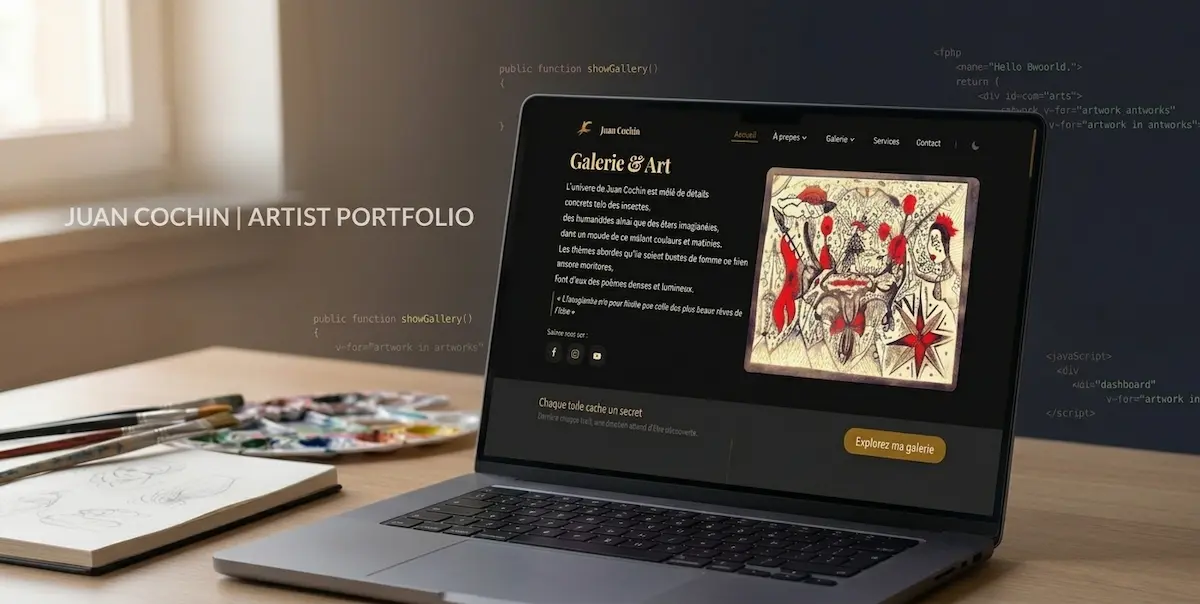
This is the challenge I solved when building Chat Rouge Art — a fullstack artist portfolio platform built with Laravel, Inertia.js, and Vue.js. A public-facing gallery that feels alive, backed by a complete admin dashboard that the artist controls entirely.
This guide documents the architecture, the decisions, and the implementation details that made it work.
Why Laravel Inertia.js and Vue.js
Before writing a line of code, the stack choice matters. For an artist portfolio with an admin dashboard, three requirements drive the decision:
Backend complexity is real. User authentication, artwork management, category filtering, contact form handling, image optimization — this is not a static site. It needs a real backend. Laravel handles all of this elegantly with minimal boilerplate.
The frontend needs to feel native. Page transitions, smooth animations, reactive filtering — a Vue.js SPA delivers this experience. But building a separate API layer adds overhead that a solo developer building for one client cannot afford.
Inertia.js eliminates the gap. It connects Laravel's backend directly to Vue.js components without a REST API. Controllers return Inertia responses. Vue components receive props directly. The result is a fullstack application that feels like a SPA but is architected like a traditional server-rendered app — with all of Laravel's power intact.
1. Project Setup
Start with a fresh Laravel installation and add Inertia.js with the Vue.js adapter:
composer create-project laravel/laravel chat-rouge-art
cd chat-rouge-art

composer require inertiajs/inertia-laravel
npm install @inertiajs/vue3 vue@3
npm install -D @vitejs/plugin-vue
Configure Vite to handle Vue in vite.config.js:
import { defineConfig } from 'vite';
import laravel from 'laravel-vite-plugin';
import vue from '@vitejs/plugin-vue';

export default defineConfig({
  plugins: [
    laravel({
      input: ['resources/js/app.js'],
      refresh: true
    }),
    vue({
      template: {
        transformAssetUrls: {
          base: null,
          includeAbsolute: false
        }
      }
    })
  ]
});
Set up the Inertia middleware in app/Http/Middleware/HandleInertiaRequests.php:
<?php

namespace App\Http\Middleware;

use Illuminate\Http\Request;
use Inertia\Middleware;

class HandleInertiaRequests extends Middleware
{
    protected $rootView = 'app';

    public function share(Request $request): array
    {
        return array_merge(parent::share($request), [
            'auth' => [
                'user' => $request->user()
            ],
            'flash' => [
                'success' => session('success'),
                'error' => session('error')
            ]
        ]);
    }
}
Register it in bootstrap/app.php and create your root Blade view resources/views/app.blade.php:
<!DOCTYPE html>
<html lang="{{ str_replace('_', '-', app()->getLocale()) }}">
<head>
  <meta charset="utf-8" />
  <meta name="viewport" content="width=device-width, initial-scale=1.0" />
  <title inertia>{{ config('app.name') }}</title>
  @vite(['resources/js/app.js'])
  @inertiaHead
</head>
<body class="antialiased">
  @inertia
</body>
</html>
Initialize Vue with Inertia in resources/js/app.js:
import { createApp, h } from 'vue';
import { createInertiaApp } from '@inertiajs/vue3';
import { resolvePageComponent } from 'laravel-vite-plugin/inertia-helpers';

createInertiaApp({
  title: (title) => `${title} — Chat Rouge Art`,
  resolve: (name) =>
    resolvePageComponent(
      `./Pages/${name}.vue`,
      globalThis._importMeta_.glob('./Pages/**/*.vue')
    ),
  setup({ el, App, props, plugin }) {
    createApp({ render: () => h(App, props) })
      .use(plugin)
      .mount(el);
  }
});
2. Database Architecture
An artist portfolio needs a clean, extensible database. Here is the migration structure for Chat Rouge Art:
// Artworks table
Schema::create('artworks', function (Blueprint $table) {
    $table->id();
    $table->string('title');
    $table->string('slug')->unique();
    $table->text('description')->nullable();
    $table->string('medium')->nullable(); // Oil, watercolor, digital
    $table->string('dimensions')->nullable();
    $table->integer('year')->nullable();
    $table->string('image_path');
    $table->string('thumbnail_path')->nullable();
    $table->foreignId('category_id')->constrained()->onDelete('cascade');
    $table->boolean('featured')->default(false);
    $table->boolean('for_sale')->default(false);
    $table->decimal('price', 10, 2)->nullable();
    $table->integer('sort_order')->default(0);
    $table->timestamps();
});

// Categories table
Schema::create('categories', function (Blueprint $table) {
    $table->id();
    $table->string('name');
    $table->string('slug')->unique();
    $table->text('description')->nullable();
    $table->string('cover_image')->nullable();
    $table->integer('sort_order')->default(0);
    $table->timestamps();
});

// Contact messages table
Schema::create('contact_messages', function (Blueprint $table) {
    $table->id();
    $table->string('name');
    $table->string('email');
    $table->string('subject')->nullable();
    $table->text('message');
    $table->boolean('read')->default(false);
    $table->timestamp('read_at')->nullable();
    $table->timestamps();
});
3. The Artwork Model
<?php

namespace App\Models;

use Illuminate\Database\Eloquent\Model;
use Illuminate\Database\Eloquent\Factories\HasFactory;
use Illuminate\Support\Str;

class Artwork extends Model
{
    use HasFactory;

    protected $fillable = [
        'title', 'slug', 'description', 'medium',
        'dimensions', 'year', 'image_path', 'thumbnail_path',
        'category_id', 'featured', 'for_sale', 'price', 'sort_order'
    ];

    protected $casts = [
        'featured' => 'boolean',
        'for_sale' => 'boolean',
        'price' => 'decimal:2'
    ];

    protected static function boot()
    {
        parent::boot();
        static::creating(function ($artwork) {
            $artwork->slug = Str::slug($artwork->title);
        });
    }

    public function category()
    {
        return $this->belongsTo(Category::class);
    }

    public function scopeFeatured($query)
    {
        return $query->where('featured', true);
    }

    public function scopeForSale($query)
    {
        return $query->where('for_sale', true);
    }

    public function getImageUrlAttribute()
    {
        return asset('storage/' . $this->image_path);
    }

    public function getThumbnailUrlAttribute()
    {
        return $this->thumbnail_path
            ? asset('storage/' . $this->thumbnail_path)
            : $this->image_url;
    }
}
4. Public Gallery Controller
The gallery is the heart of the portfolio. It needs filtering, pagination, and fast loading:
<?php

namespace App\Http\Controllers;

use App\Models\Artwork;
use App\Models\Category;
use Inertia\Inertia;
use Illuminate\Http\Request;

class GalleryController extends Controller
{
    public function index(Request $request)
    {
        $categories = Category::orderBy('sort_order')->get();

        $artworks = Artwork::with('category')
            ->when($request->category, function ($query, $category) {
                $query->whereHas('category', fn($q) =>
                    $q->where('slug', $category)
                );
            })
            ->when($request->search, function ($query, $search) {
                $query->where(function ($q) use ($search) {
                    $q->where('title', 'like', "%{$search}%")
                      ->orWhere('medium', 'like', "%{$search}%")
                      ->orWhere('description', 'like', "%{$search}%");
                });
            })
            ->orderBy('sort_order')
            ->orderBy('created_at', 'desc')
            ->paginate(12)
            ->withQueryString();

        return Inertia::render('Gallery/Index', [
            'artworks' => $artworks,
            'categories' => $categories,
            'filters' => $request->only(['category', 'search'])
        ]);
    }

    public function show(Artwork $artwork)
    {
        $artwork->load('category');

        $related = Artwork::where('category_id', $artwork->category_id)
            ->where('id', '!=', $artwork->id)
            ->limit(4)
            ->get();

        return Inertia::render('Gallery/Show', [
            'artwork' => $artwork,
            'related' => $related
        ]);
    }
}
5. The Gallery Vue Component
<template>
  <PublicLayout>
    <!-- Filter Bar -->
    <div class="filter-bar">
      <button
        v-for="category in categories"
        :key="category.id"
        @click="filterByCategory(category.slug)"
        :class="['filter-btn', filters.category === category.slug ? 'active' : '']"
      >
        {{ category.name }}
      </button>
      <button @click="filterByCategory(null)" class="filter-btn">
        All
      </button>
    </div>

    <!-- Search -->
    <div class="search-bar">
      <input
        v-model="searchQuery"
        @input="debouncedSearch"
        type="text"
        placeholder="Search artworks..."
        class="search-input"
      />
    </div>

    <!-- Artwork Grid -->
    <TransitionGroup
      name="gallery"
      tag="div"
      class="artwork-grid"
    >
      <div
        v-for="artwork in artworks.data"
        :key="artwork.id"
        class="artwork-card"
        @click="openArtwork(artwork)"
      >
        <div class="artwork-image-wrapper">
          <img
            :src="artwork.thumbnail_url"
            :alt="artwork.title"
            class="artwork-image"
            loading="lazy"
          />
          <div class="artwork-overlay">
            <h3>{{ artwork.title }}</h3>
            <p>{{ artwork.medium }} — {{ artwork.year }}</p>
            <span v-if="artwork.for_sale" class="for-sale-badge">
              Available
            </span>
          </div>
        </div>
      </div>
    </TransitionGroup>

    <!-- Pagination -->
    <Pagination :links="artworks.links" />
  </PublicLayout>
</template>

<script setup>
import { ref } from 'vue';
import { router } from '@inertiajs/vue3';
import { useDebounceFn } from '@vueuse/core';
import PublicLayout from '@/Layouts/PublicLayout.vue';
import Pagination from '@/Components/Pagination.vue';

const props = defineProps({
  artworks: Object,
  categories: Array,
  filters: Object
});

const searchQuery = ref(props.filters.search || '');

const filterByCategory = (slug) => {
  router.get(route('gallery.index'), {
    category: slug,
    search: searchQuery.value
  }, {
    preserveState: true,
    replace: true
  });
};

const debouncedSearch = useDebounceFn(() => {
  router.get(route('gallery.index'), {
    search: searchQuery.value,
    category: props.filters.category
  }, {
    preserveState: true,
    replace: true
  });
}, 300);

const openArtwork = (artwork) => {
  router.visit(route('gallery.show', artwork.slug));
};
</script>
6. Admin Dashboard Architecture
The admin dashboard is what makes this a complete product rather than a showcase. The artist manages everything — no developer required after delivery.
Protect all admin routes with authentication middleware:
// routes/web.php
Route::middleware(['auth'])->prefix('admin')->name('admin.')->group(function () {
    Route::get('/', [AdminController::class, 'index'])->name('dashboard');
    Route::resource('artworks', AdminArtworkController::class);
    Route::resource('categories', AdminCategoryController::class);
    Route::get('messages', [AdminMessageController::class, 'index'])->name('messages.index');
    Route::patch('messages/{message}/read', [AdminMessageController::class, 'markRead'])->name('messages.read');
});
The admin artwork controller handles image upload and optimization:
<?php

namespace App\Http\Controllers\Admin;

use App\Models\Artwork;
use App\Http\Controllers\Controller;
use Illuminate\Http\Request;
use Illuminate\Support\Facades\Storage;
use Inertia\Inertia;
use Intervention\Image\Facades\Image;

class AdminArtworkController extends Controller
{
    public function index()
    {
        return Inertia::render('Admin/Artworks/Index', [
            'artworks' => Artwork::with('category')
                ->orderBy('sort_order')
                ->paginate(20)
        ]);
    }

    public function store(Request $request)
    {
        $validated = $request->validate([
            'title' => 'required|string|max:255',
            'description' => 'nullable|string',
            'medium' => 'nullable|string|max:100',
            'dimensions' => 'nullable|string|max:100',
            'year' => 'nullable|integer|min:1900|max:' . date('Y'),
            'category_id' => 'required|exists:categories,id',
            'image' => 'required|image|max:10240',
            'featured' => 'boolean',
            'for_sale' => 'boolean',
            'price' => 'nullable|numeric|min:0'
        ]);

        if ($request->hasFile('image')) {
            $image = $request->file('image');
            $path = $image->store('artworks', 'public');

            // Generate optimized thumbnail
            $thumbnail = Image::make($image)
                ->fit(600, 600)
                ->encode('jpg', 85);

            $thumbnailPath = 'artworks/thumbnails/' . basename($path);
            Storage::disk('public')->put($thumbnailPath, $thumbnail);

            $validated['image_path'] = $path;
            $validated['thumbnail_path'] = $thumbnailPath;
        }

        Artwork::create($validated);

        return redirect()->route('admin.artworks.index')
            ->with('success', 'Artwork added successfully');
    }

    public function destroy(Artwork $artwork)
    {
        Storage::disk('public')->delete($artwork->image_path);
        Storage::disk('public')->delete($artwork->thumbnail_path);
        $artwork->delete();

        return redirect()->route('admin.artworks.index')
            ->with('success', 'Artwork deleted successfully');
    }
}
7. Dark and Light Mode
Artists care deeply about how their work is presented. Dark mode makes colors pop. Light mode makes details clear. Both matter.
Manage theme preference in a composable resources/js/composables/useTheme.js:
import { ref, watch, onMounted } from 'vue';

const THEME_KEY = 'chat-rouge-theme';

export const useTheme = () => {
  const isDark = ref(false);

  const applyTheme = (dark) => {
    document.documentElement.classList.toggle('dark', dark);
    localStorage.setItem(THEME_KEY, dark ? 'dark' : 'light');
  };

  const toggleTheme = () => {
    isDark.value = !isDark.value;
    applyTheme(isDark.value);
  };

  onMounted(() => {
    const saved = localStorage.getItem(THEME_KEY);
    const prefersDark = window.matchMedia('(prefers-color-scheme: dark)').matches;
    isDark.value = saved ? saved === 'dark' : prefersDark;
    applyTheme(isDark.value);
  });

  return { isDark, toggleTheme };
};
Use it in your navbar component with a smooth toggle button that remembers the user's preference across sessions.
8. Animations That Make Art Feel Alive
The gallery needed to feel like walking into an exhibition, not loading a webpage. Three animation decisions made the biggest difference:
Staggered entrance animations — artworks appear one by one as the page loads, giving the eye time to settle on each piece before the next appears.
Smooth filtering transitions — when a category filter is applied, artworks that leave fade out and scale down slightly. Artworks that enter fade in and scale up. The grid never jumps.
Artwork detail reveal — opening a single artwork triggers a full-screen transition where the image expands from its grid position to fill the viewport, maintaining visual continuity.
These were implemented with Vue's built-in <Transition> and <TransitionGroup> components combined with CSS custom properties for timing control.
9. What the Artist Can Do Without a Developer
This is the real measure of a successful client project. After delivery, the artist can independently:
- Add, edit, and delete artworks with image upload
- Create and manage categories
- Mark artworks as featured or available for sale
- Set prices on individual pieces
- Read and manage contact messages from collectors
- Toggle dark and light mode preference
- Update biography and contact information
Zero developer dependency after launch. That is what makes a client satisfied enough to give a testimonial and refer new clients.
Conclusion
Building a fullstack artist portfolio is an exercise in balance. The public face must be emotional, beautiful, and fast. The backend must be powerful, reliable, and invisible to the person using it.
Laravel gives you the backend power. Inertia.js removes the API complexity. Vue.js delivers the frontend experience. Together they produce something that neither a static site builder nor a headless CMS can match — a fully custom platform that the client owns completely.
Chat Rouge Art was my first completed fullstack freelance project. It gave me my first real testimonial. It proved that the combination of technical depth and design sensitivity produces work that clients value and remember.
That combination is what Dywan Dev is built on.
Need a fullstack portfolio, business platform, or custom web application? At Dywan Dev I build complete solutions — not just websites. Start a conversation.