
Introduction
It started with one client.
A restaurant owner who needed a website. Not complicated. Not expensive. Just something that looked like his business — warm, welcoming, and real. I built it. He was happy. I moved on.
Then another restaurant reached out. Different style. Different audience. Different brand identity entirely. I started building again from scratch and somewhere around hour three I stopped and asked myself a question that changed how I think about templates:
Why am I rebuilding the same structure for the third time?
Every restaurant website shares the same skeleton. A hero that makes food look irresistible. A menu that's easy to browse. A story that builds trust. A contact section that converts visitors into reservations. The structure never changes. Only the personality does.
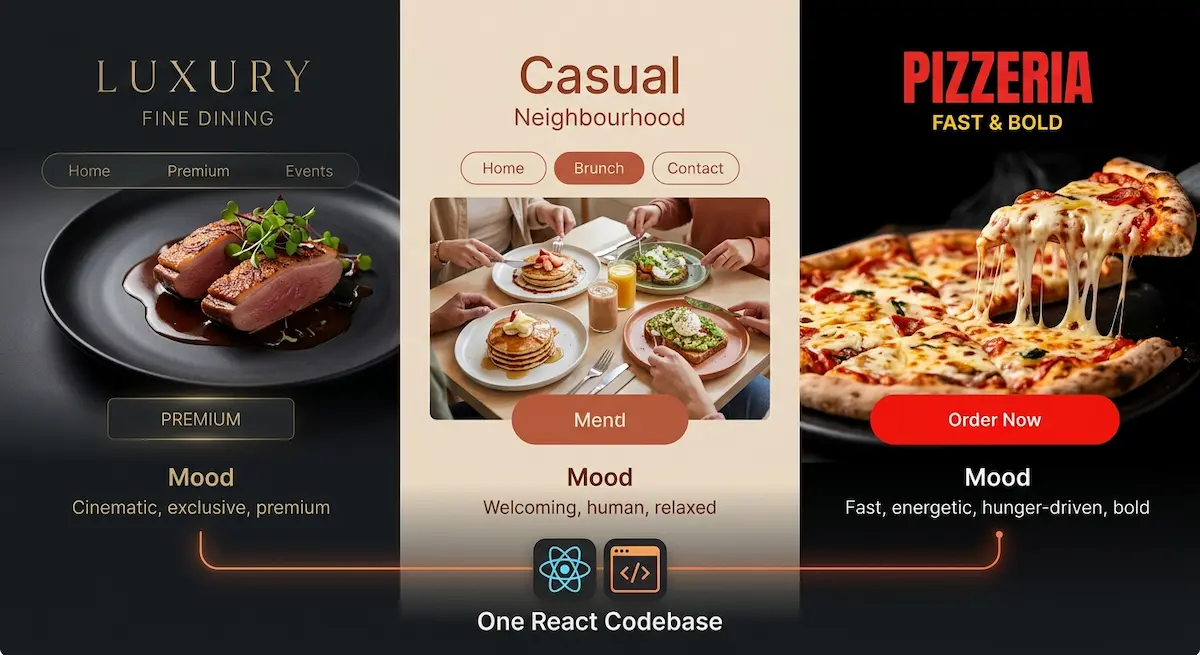
That observation became Savoura Dywan — a single React codebase that produces three genuinely distinct restaurant websites. Luxury fine dining. Casual neighbourhood restaurant. Fast and bold pizzeria. One build. Three identities. Zero compromise on quality.
This is the complete story of how I built it and why every decision was made.
1. The Problem With Existing Restaurant Templates
Before building anything, I spent time studying what already existed in the market.
Most restaurant templates fall into one of two categories.
The first category is beautiful but rigid. Stunning design, hardcoded content, no real customization beyond swapping images and changing text directly in component files. A developer can use it. A restaurant owner cannot. And a developer who wants to deliver it to three different clients has to rebuild it three times.
The second category is flexible but generic. Page builders, drag-and-drop tools, WordPress themes with endless options. Maximum flexibility, minimum personality. Every restaurant ends up looking like every other restaurant.
Neither category solved the real problem: a restaurant owner needs a website that feels like their specific business, delivered fast, at a price that makes sense for a local business.
Savoura Dywan was designed to sit in the gap between these two categories. Opinionated enough to have genuine personality. Flexible enough to serve different business types. Simple enough that customization requires changing one file, not rebuilding the codebase.
2. Defining the Three Variants
The three variants were not chosen arbitrarily. They map to three genuinely different restaurant audiences with different visual expectations and different customer psychology.
Luxury — Fine Dining
The luxury variant serves restaurants where the experience is the product. A tasting menu restaurant. A high-end seafood house. A gastronomic destination.
The customer arriving at this website has already decided to spend money. They are not comparing prices. They are evaluating prestige, atmosphere, and exclusivity. The website must communicate all three before a single word is read.
Visual language: dark backgrounds, gold accents, serif typography with wide letter spacing, slow and elegant animations, full-viewport hero with cinematic imagery, generous whitespace that communicates premium positioning.
Casual — Neighbourhood Restaurant
The casual variant serves restaurants where warmth and community are the product. A family trattoria. A neighbourhood bistro. A brunch spot with a loyal local following.
The customer arriving here wants to feel at home before they arrive. They want to see smiling food, readable menus, and a personality that feels human rather than corporate.
Visual language: warm earth tones, rounded corners, friendly sans-serif typography, bouncy animations with spring physics, approachable hero with natural lighting, sections that feel like a conversation rather than a presentation.
Pizzeria — Fast and Bold
The pizzeria variant serves restaurants where speed, appetite, and energy are the product. A late-night pizza spot. A delivery-first operation. A counter service concept.
The customer arriving here is hungry. They want to see the product immediately, find the menu fast, and place an order or call without friction.
Visual language: high contrast dark background, bold red and yellow accents, heavy condensed typography, fast snappy animations, hero dominated by product photography, prominent call-to-action above the fold.
Three variants. Three psychologies. Three completely different customer journeys — from one codebase.
3. The Architecture Decision That Made It Possible
The temptation when building something like this is to use conditional rendering everywhere. An if luxury here. A switch variant there. It starts clean and becomes unmanageable within weeks.
I made one foundational decision that prevented this: the codebase does not know which restaurant it serves. The configuration does.
Everything variant-specific lives in two files. siteConfig.js contains all content, contact details, feature toggles, and the variant identifier. themes.js contains the complete visual personality of each variant — colors, typography, spacing, animation speeds, border radius values, and shadow styles.
Every component reads from these files through a central theme context. No component contains variant-specific logic unless the layout genuinely differs between variants. And when layouts do differ, a simple resolver pattern handles it cleanly.
// The only place variant logic lives in components
const HeroComponent = {
  luxury: LuxuryHero,
  casual: CasualHero,
  pizzeria: PizzeriaHero
}[variant];

return <HeroComponent />;
This architecture has one consequence that matters enormously for selling the template: a buyer changes variant: 'luxury' to variant: 'casual' in one file and the entire website transforms. Colors, fonts, animations, spacing, personality — everything updates instantly.
That is not just good engineering. That is a feature that closes sales.
4. Building the Menu System
The menu is the most important section of any restaurant website. It is where visitors make the decision to come in or move on. Getting it wrong loses the sale before the restaurant even gets a chance.
Savoura Dywan's menu system is fully config-driven. All menu content lives in siteConfig.js:
menu: {
  categories: [
    {
      id: 'starters',
      name: 'Starters',
      nameAr: 'المقبلات',
      nameFr: 'Entrées',
      items: [
        {
          id: 1,
          name: 'Burrata & Heirloom Tomato',
          nameAr: 'بوراتا وطماطم',
          nameFr: 'Burrata et Tomate',
          description: 'Fresh burrata with seasonal heirloom tomatoes, aged balsamic, and micro basil',
          price: 14,
          currency: 'USD',
          image: '/menu/burrata.jpg',
          tags: ['vegetarian', 'gluten-free'],
          featured: true,
          available: true
        }
      ]
    }
  ],
  displayStyle: 'grid', // 'grid' | 'list' | 'magazine'
  showImages: true,
  showCalories: false,
  enableFilters: true
}
The menu component reads this configuration and renders accordingly. Switching displayStyle from grid to list changes the entire menu layout. Toggling showImages removes photography for restaurants that prefer a text-only menu. Enabling filters adds a category filter bar automatically.
Each menu item supports three languages natively. When the visitor switches to Arabic, the menu renders in Arabic with RTL layout. French visitors see French. English is the fallback. No developer work required after initial setup.
5. Multilingual Support and RTL — The Differentiator
This feature alone separates Savoura Dywan from the majority of competing restaurant templates.
The MENA market — Morocco, Algeria, Tunisia, Egypt, the Gulf states — has millions of restaurants with no professional web presence. Most available templates do not support Arabic. Most that claim to support it implement it poorly — broken layouts, mixed text directions, fonts that render Arabic incorrectly.
Savoura Dywan handles Arabic as a first-class language, not an afterthought.
The implementation uses i18next for content translation and a custom direction hook that updates the HTML dir attribute, CSS logical properties, and animation directions simultaneously when the language switches.
export const useDirection = () => {
  const { i18n } = useTranslation();

  useEffect(() => {
    const isRTL = ['ar'].includes(i18n.language);
    document.documentElement.dir = isRTL ? 'rtl' : 'ltr';
    document.documentElement.lang = i18n.language;
    document.documentElement.setAttribute('data-direction', isRTL ? 'rtl' : 'ltr');
  }, [i18n.language]);
};
The data-direction attribute allows CSS and Framer Motion animations to respond to direction changes. Slide-in animations reverse correctly. Images that imply direction mirror appropriately. The entire layout flips without a single layout bug.
For a Moroccan restaurant serving both French and Arabic-speaking customers, this is not a nice-to-have. It is a business requirement. Savoura Dywan delivers it out of the box.
6. PWA — The Feature Clients Perceive as Magic
Every client I have shown the PWA feature to has had the same reaction. They pick up their phone, visit the demo, see the install prompt, tap it, and watch the website appear on their home screen like a native app. Their eyes widen slightly.
That moment is worth more in a sales conversation than any technical explanation.
The implementation uses Vite PWA Plugin with a carefully configured Workbox setup. The key decisions were:
Offline support for the menu. If a customer is browsing the menu in an area with poor signal — which happens frequently in many Moroccan cities — the menu continues to work from cache. The restaurant does not lose a potential customer to a loading spinner.
Update notifications. When the restaurant owner updates their menu or adds a promotion, returning visitors who have the PWA installed see a notification prompting them to refresh. They always see current information.
Install prompt timing. The install prompt appears after a visitor has spent thirty seconds on the site — enough time to show genuine interest without interrupting the first impression.
export const usePWAInstall = () => {
  const [installPrompt, setInstallPrompt] = useState(null);
  const [showPrompt, setShowPrompt] = useState(false);

  useEffect(() => {
    const handler = (e) => {
      e.preventDefault();
      setInstallPrompt(e);

      // Wait 30 seconds before showing install UI
      setTimeout(() => setShowPrompt(true), 30000);
    };

    window.addEventListener('beforeinstallprompt', handler);
    return () => window.removeEventListener('beforeinstallprompt', handler);
  }, []);

  const install = async () => {
    if (!installPrompt) return;
    await installPrompt.prompt();
    setShowPrompt(false);
    setInstallPrompt(null);
  };

  return { showPrompt, install };
};
7. The Reservation and WhatsApp Flow
Most restaurant websites in Morocco and the broader MENA region do not use online reservation systems. The primary contact method is WhatsApp. Any template ignoring this reality is not built for this market.
Savoura Dywan includes a floating WhatsApp button that pre-fills a message with the restaurant name and a reservation prompt:
export const WhatsAppButton = () => {
  const { config } = useTheme();

  if (!config.features.enableWhatsApp) return null;

  const message = encodeURIComponent(
    `Hello, I'd like to make a reservation at ${config.branding.name}.`
  );

  const url = `https://wa.me/${config.contact.whatsapp.replace(/\\D/g, '')}?text=${message}`;

  return (
    <motion.a
      href={url}
      target="_blank"
      rel="noopener noreferrer"
      className="whatsapp-float"
      whileHover={{ scale: 1.1 }}
      whileTap={{ scale: 0.95 }}
      aria-label="Contact us on WhatsApp"
    >
      <WhatsAppIcon />
    </motion.a>
  );
};
Toggle it with enableWhatsApp: true in the config. Set the number once. Every reservation inquiry goes directly to the restaurant owner's phone. No booking system fees. No third-party dependencies. Just the communication channel that actually works in this market.
8. Performance — Because a Slow Restaurant Website Loses Customers
A visitor waiting more than three seconds for a restaurant website to load will leave. They will not wait. They will find another restaurant.
Performance was not an optimization pass at the end of Savoura Dywan's development. It was a design constraint from the beginning.
The key decisions:
Lazy loading all images. Hero images load immediately. Every other image loads as the visitor scrolls to it. The initial page load carries only what is visible above the fold.
Font optimization. Google Fonts are loaded with display=swap and preconnect hints in the document head. Text renders immediately in the fallback font and swaps to the custom font when it arrives — no invisible text during load.
Code splitting per route. React Router lazy loads each page component. A visitor landing on the home page does not download the menu page code until they navigate to it.
Vite build optimization. Manual chunk splitting separates vendor libraries from application code. Framer Motion, i18next, and React are in separate chunks that cache independently. Updating the menu content does not invalidate the Framer Motion cache.
The result across all three variants is a Lighthouse performance score consistently above 90 on mobile — the device that the majority of restaurant customers use to decide where to eat.
9. The 90% Problem and How I Solved It
I will be honest. Savoura Dywan reached 90% completion three separate times before it was actually finished.
The first 90% was the core layout and all three variant designs. Then I added multilingual support — 90% again. Then PWA, animations, and the config architecture — 90% again.
Each time I reached what felt like done, something new felt necessary. A new feature. A refinement. A better way to organize the config file. And each addition reset the feeling of completion without moving the product meaningfully forward.
The question that finally broke the cycle was simple: would a paying customer notice the difference between what I have now and what I am about to add?
When the answer was no — I stopped and shipped.
This is the most important lesson I learned building Savoura Dywan. Perfectionism and quality are not the same thing. A shipped product that solves the problem is more valuable than an unshipped product that solves it slightly better.
Version two exists for a reason.
10. What Savoura Dywan Delivers Out of the Box
For a restaurant owner or a developer delivering a restaurant project, Savoura Dywan provides:
Three complete visual variants with distinct personalities covering the majority of restaurant business types. Full multilingual support in English, French, and Arabic with correct RTL layout — a feature unavailable in most competing templates. PWA capability with offline menu access and home screen installation. A fully config-driven architecture where all content, branding, and feature toggles live in one file. Framer Motion animations tuned to each variant's personality. WhatsApp integration built for the MENA market. SEO setup including meta tags, Open Graph, Twitter cards, and structured business data. Mobile-first responsive layout optimized for the devices restaurant customers actually use.
A developer using Savoura Dywan to deliver a restaurant project saves between two and four days of build time compared to building from scratch. At any reasonable freelance rate, that saving pays for the template many times over on the first project alone.
Conclusion
Savoura Dywan started as a question: why rebuild the same structure repeatedly when the only thing that changes is the personality?
The answer became a product. A product built not just for developers looking for a shortcut, but for restaurant owners who need a professional web presence without custom development costs, and for the specific market realities of Morocco and the broader MENA region where multilingual support and WhatsApp integration are not optional features.
Every architectural decision — the config-driven system, the theme context, the variant resolver pattern, the RTL implementation — was made to serve one outcome: a template that feels completely custom while requiring minimal configuration.
That is what separates a template from a template engine.
Savoura Dywan is available now on Dywan Dev. Three complete restaurant variants, multilingual RTL support, PWA capability, and full configuration from a single file. Built for developers who deliver fast and restaurant owners who want professional results without custom development costs. Get Savoura Dywan.